











Pulse for Mac
- Trial version
- 4.2
- V0.15.13
Download for Mac
View an ad to download for free

- SuperAgents, LLC
Track stocks, crypto, watchlists and portfolio P&L from your Mac menu bar
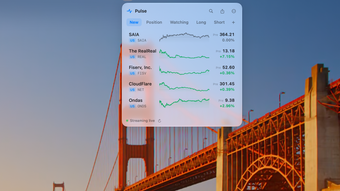
Pulse is a Mac menu bar app for checking market prices and your portfolio while you work. It supports stocks in the US, Hong Kong, mainland China, Taiwan, Japan and South Korea, plus ETFs, indexes, crypto and precious metals.
Key features
• Display prices and changes in the menu bar, with optional rotation through multiple symbols.
• Create multiple watchlists, search by symbol or company name, and reorder your lists.
• Record quantities, costs and buy/sell transactions to track today's P&L and unrealized P&L.
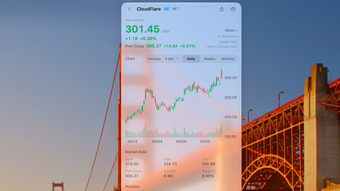
• View candlestick charts with volume and intraday charts, including US pre-market and after-hours sessions.
• Optionally connect your own Longbridge account for pushed quotes in supported markets, subject to that account's quote permissions.
• Optional local MCP integration lets compatible AI clients manage watchlists and positions.
Getting started
Launch Pulse, find a symbol and add it to a watchlist. Open the menu bar panel to see your lists, then select a symbol for charts and quote details. Enter quantities and costs, or record transactions, to track position P&L. Watchlists, positions and transaction records are stored on your Mac. No Pulse account is required.
Requirements and purchase
Version 0.15.13 requires macOS 14 Sonoma or later and supports Apple silicon and Intel Macs. Try all features free for 30 days, then make a one-time purchase to keep using them. There is no subscription. After the trial ends, quote updates stop until purchase; your watchlists and position data remain on your Mac. Check the official website for current pricing and purchase terms.
Market data and limits
Refresh rates and delays vary by market and data source. Standard Japanese stock quotes are delayed about 20 minutes and Hong Kong quotes about 15 minutes. Not every quote is real-time. Pulse is for market tracking and record keeping; it does not place brokerage orders or execute trades. Market data is informational and is not investment advice.
Loading…

App specs
Developer
- SuperAgents, LLC
License
Trial version
Version
0.15.13
Latest update
Platform
Mac
OS
Mac OS X
Language
English
Available languages
- English
- Chinese
- Japanese
Size
10.09 MB
Program available in other languages
Pulse for Mac
- Trial version
- 4.2
- V0.15.13
Download for Mac
View an ad to download for free
User reviews about Pulse
Have you tried Pulse? Be the first to leave your opinion!
Add reviewTop downloads Finance for Mac
Top downloads Finance for Mac
Top downloads Finance for Mac
Related topics about Pulse
Latest articles

Parasite Eve could be Square Enix’s next RPG revival: survival horror is booming again

Razer just released Pokémon gaming headsets: Sylveon, Charizard and Lucario

The Boys’ Homelander recast rumor: it only affects the games

The Departed still holds up today: Matt Damon’s best crime thriller

Ember’s latest analysis: Iran oil shock boosts EV sales worldwide
Laws concerning the use of this software vary from country to country. We do not encourage or condone the use of this program if it is in violation of these laws. Softonic may receive a referral fee if you click or buy any of the products featured here.